Superhuman, Shortwave or Gemini in Gmail: which fits how you work?
Pick Superhuman if you live in your inbox on Gmail or Microsoft 365 and want speed, shortcuts and drafts written for you (Starter is $30 a month, or $25 a month billed yearly). Pick Shortwave if you use Gmail and want an inbox that sorts and drafts for you, with a free plan to start. Pick Gemini if you want help without leaving Gmail. All three draft replies. Superhuman can also send for you, if you allow it. Prices and features were checked on each company's own pages on 14 October 2026.
Updated
What does each one actually do?
Superhuman and Shortwave are full email apps that replace the screen Gmail gives you. Gemini is not a new app: it lives inside the Gmail you already use.
Superhuman Mail works with Gmail and Microsoft 365 accounts only ("We only support Gmail and Microsoft 365 hosted accounts at the moment"), on Mac, Windows, the web, iPhone and Android, and has a mode that runs inside Gmail. Shortwave "connects natively to Gmail & Google Workspace accounts" on the same platforms; Microsoft 365 and Exchange are "not supported at this time", and Outlook.com works only by forwarding, which means you cannot send from your Outlook address.
So your mailbox decides first. On Microsoft 365, of these three only Superhuman works. On Gmail, all three do.
Which one fits if you live in your inbox?
Superhuman is built for speed and the keyboard. Its Mail page says you will "Fly through your email twice as fast as before", a claim it gives no method for. Every paid plan has Split Inbox, Send Later, Auto Archive, Auto Labels, Auto Reminders, shared conversations and team comments; Business and Enterprise add HubSpot, Salesforce and Pipedrive.
Shortwave puts its effort into sorting. On Business and up, its AI filters can label, archive, delete or star new mail on their own, and it adds splits, bundles, scheduled send and follow-up reminders. Every plan has team tools: shared labels, comments and assignees.
Gemini asks for no new habits. Help me write drafts or polishes an email, suggested replies offer answers at the end of a thread, and AI Overviews sum up long threads. On Google Workspace plans, a side panel can also "Create new emails or refine existing drafts for tone and clarity". It leaves the shape of your inbox alone.
How do they write replies for you?
All three learn from how you write. They differ in what else they read.
Superhuman's Auto Drafts (Business plan and up) writes replies for you. Its help page says that to learn your tone "we analyze a sample of your recent emails", and its homepage says drafts use "context from your inbox, calendar, and the web". Its Knowledge Base takes files and public links, but "published pages (Notion, Google Docs, Confluence, etc) cannot be added". Shortwave learns "how you write from the emails you send, including your writing style, tone, and even facts about you" (Pro and up). On Business and up, it also reads PDFs and other attachments and connects to Notion, Slack, Asana, Linear, Zapier and MCP; Google Drive is not on its list. Gemini's Help me write "proactively takes details from your other emails and Drive files".
So if a reply rests on a file, Gemini can reach your Google Drive, Superhuman reaches what you add to its Knowledge Base, and Shortwave, on Business and up, reads what is attached.
Does any of them send email for you?
Superhuman can, if you let it. Its Mail page says its AI can send "fully written emails on your behalf" if you want. Its Mail MCP server (Business plan and up), which lets ChatGPT or Claude work in your Superhuman inbox, has a send tool. Your AI app asks before each action by default, but an admin can set each tool to "Always Allow"; Superhuman's own tip is to keep the send tool on "Needs approval". Auto Drafts are different: Superhuman's Email Assistant help says "They are never sent automatically."
Shortwave's pages do not say its assistant sends mail by itself. Its changelog (28 February 2025) says the assistant "now waits for action confirmation while organizing your inbox"; that covers organizing, not sending. Since 6 January 2026, Shortwave also works with its sister product Tasklet. Shortwave's post "Fully Automate Your Email with Shortwave + Tasklet" says that when Tasklet drafts a reply, it shows up in Shortwave for you to "Review it, tweak it, and send it"; on its own page, Tasklet says its agents can "Automatically respond to emails".
No Google page says Gemini in Gmail sends email for you. Tasks in the Gemini app, an experimental feature, can reply to email and asks for your review before "Sending communications".
Two of them also act on mail coming in without asking each time: Shortwave's AI filters and Superhuman's Auto Archive and Auto Labels tidy your inbox. That moves your mail around; it does not send anything.
What do they cost?
Superhuman has no free Mail plan. Its Mail plans page lists Starter at $30 a month, or $25 billed yearly, and Business at $40, or $33 billed yearly; Business adds Auto Drafts, Ask AI, Voice and Tone Match and the Knowledge Base.
Shortwave lists Free at $0 (it adds a "Sent with Shortwave" signature), Pro $18, Business $30, Premier $45 and Max $120 per seat a month, billed monthly. A third-party tracker reported a June 2026 price rise, but Shortwave's archived page shows the monthly prices were already these. What changed is that the cheaper yearly option was removed.
Gemini's Help me write and suggested replies are free on a personal Gmail account, in the US only. Asking questions about your inbox needs Google AI Plus ($4.99 a month), Pro ($19.99) or Ultra, or a Google Workspace plan. Google Workspace business plans include Gemini in Gmail.
Where does Tatsulok fit, and when should you not use it?
Tatsulok is not an email client, and not a fourth pick on this list. There is no inbox view, no triage, no split inbox and no keyboard shortcuts for mail. You keep Gmail or Outlook. If you want a faster inbox, choose one of the three above.
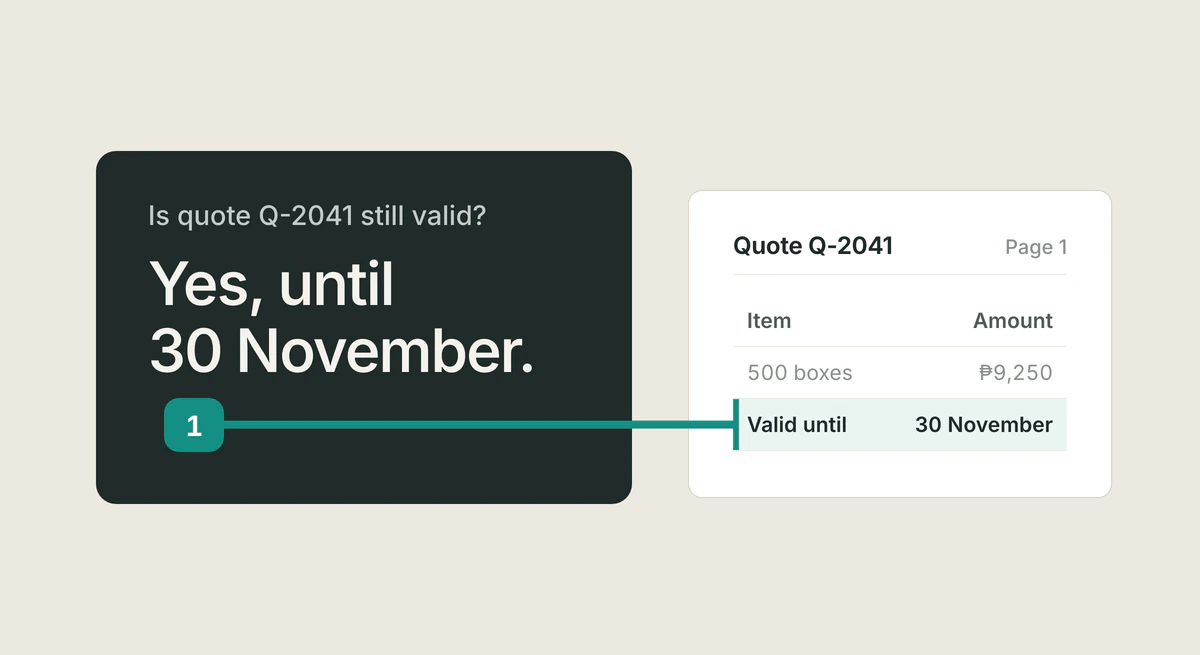
Tatsulok helps with a different moment: the reply that rests on a document. You connect your mail and your files in Tatsulok under Extensions. Tatsu reads the thread and the files, writes the reply into your Drafts, and cites what it used, so you can open the line before you trust it. A client asks whether your quote still holds; Tatsu drafts "Yes, Lea. Quote Q-2041 still holds, until 30 November" and cites the quote's validity line. You fix what is wrong, press Send Email, and confirm. In the mail connection, Tatsu has no send action: only your Send button, or a send time you set, sends the email.
Two things to know today: the mail and Drive connections are in Beta, and Google has not finished verifying Tatsulok's app, so you will see Google's unverified-app screen and choose Advanced to continue. See connect your email, or which assistants can read, draft and send from your Gmail.
FAQ
- Is Superhuman worth it over Gmail with Gemini?
- If keyboard speed is how you already work, it can be: Superhuman replaces the Gmail screen with an app built around shortcuts, Split Inbox and Send Later, from $30 a month. If you want help without a new app, Gemini works inside Gmail, and Help me write is free on personal Gmail accounts in the US.
- Does Shortwave work with Outlook?
- Not natively. Shortwave says Microsoft 365 and Exchange are "not supported at this time", and Outlook.com works only by forwarding into a Gmail account, without sending from your Outlook address (checked 14 October 2026). Of these three, Superhuman is the one that supports Microsoft 365.
- Can Superhuman or Shortwave send emails without me?
- Superhuman can, if you allow it: its Mail page offers sending "fully written emails on your behalf", and an admin can let an AI app use its Mail MCP send tool without asking. Its Auto Drafts are "never sent automatically". Shortwave's pages do not say its assistant sends on its own; its confirmation step covers organizing your inbox. Shortwave says that when its sister product Tasklet drafts a reply, it shows up for you to review and send, though Tasklet's own page says its agents can "Automatically respond to emails".
- Did Shortwave raise its prices in 2026?
- Not its monthly prices. A third-party tracker called a June 2026 change a price rise, but Shortwave's archived page shows Pro $18, Business $30, Premier $45 and Max $120 a month before and after. The cheaper yearly option was removed.
- Is Tatsulok an email client?
- No. It has no inbox view or mail triage. You keep Gmail or Outlook; Tatsulok reads your threads and files, drafts the reply with sources you can open, and you press Send.
Sources
- Superhuman: Mail plans, prices and feature table
- Superhuman: homepage, Auto Drafts
- Superhuman: Mail (checked 14 October 2026)
- Superhuman Help Center: managing accounts (updated 2 October 2026)
- Superhuman Help Center: Auto Reminders and Auto Drafts (updated 12 October 2026)
- Superhuman Help Center: Knowledge Base (updated 1 September 2026)
- Superhuman Help Center: Email Assistant in Gmail (updated 30 September 2026)
- Superhuman Help Center: Superhuman Mail MCP Server (updated 22 September 2026)
- Shortwave: pricing
- Shortwave docs: use Shortwave with other email providers
- Shortwave docs: AI assistant
- Shortwave changelog
- Shortwave blog: Fully Automate Your Email with Shortwave + Tasklet (6 January 2026)
- Tasklet
- Internet Archive: Shortwave pricing page, 8 June 2026
- Google Help: Gemini in the Gmail side panel
- Google Help: Draft emails with Gemini in Gmail
- Google Help: Learn about Gemini features in Gmail
- Google Help: Tasks in the Gemini app
- Google: Gemini subscription plans
- Google blog: Gmail is entering the Gemini era (8 January 2026)
Related guides
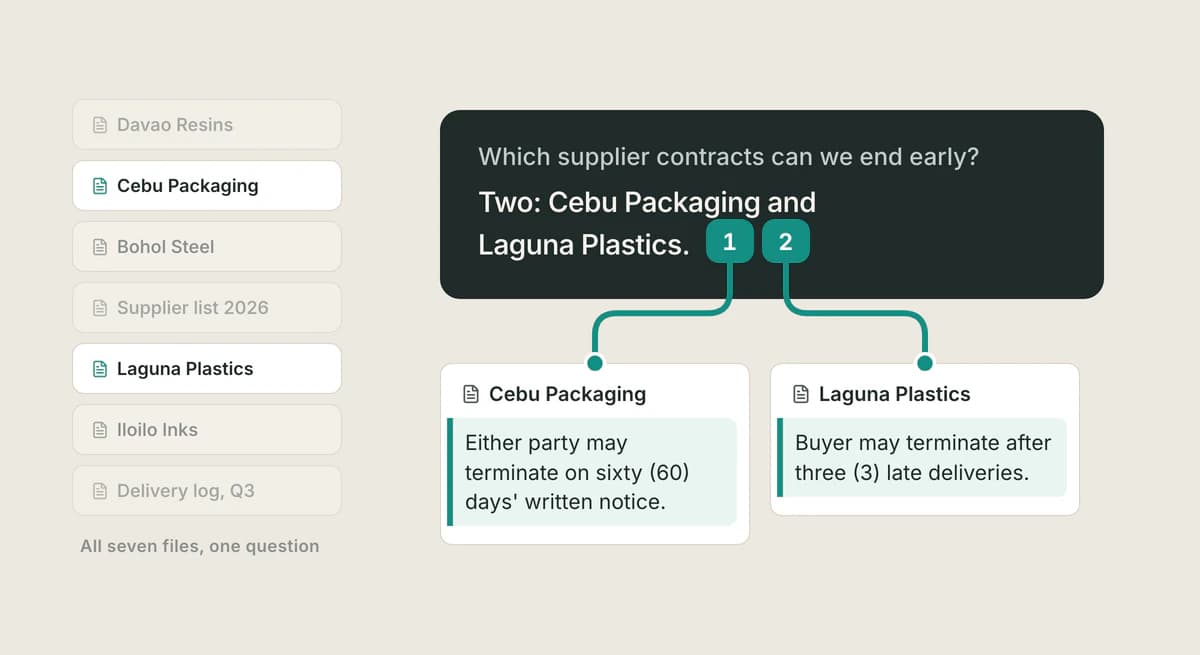
ChatPDF alternative
Outgrowing ChatPDF's 2-PDF daily cap and 120-page limit? Compare alternatives for chatting with documents, and what changes when every answer cites its exact passage.
Read the article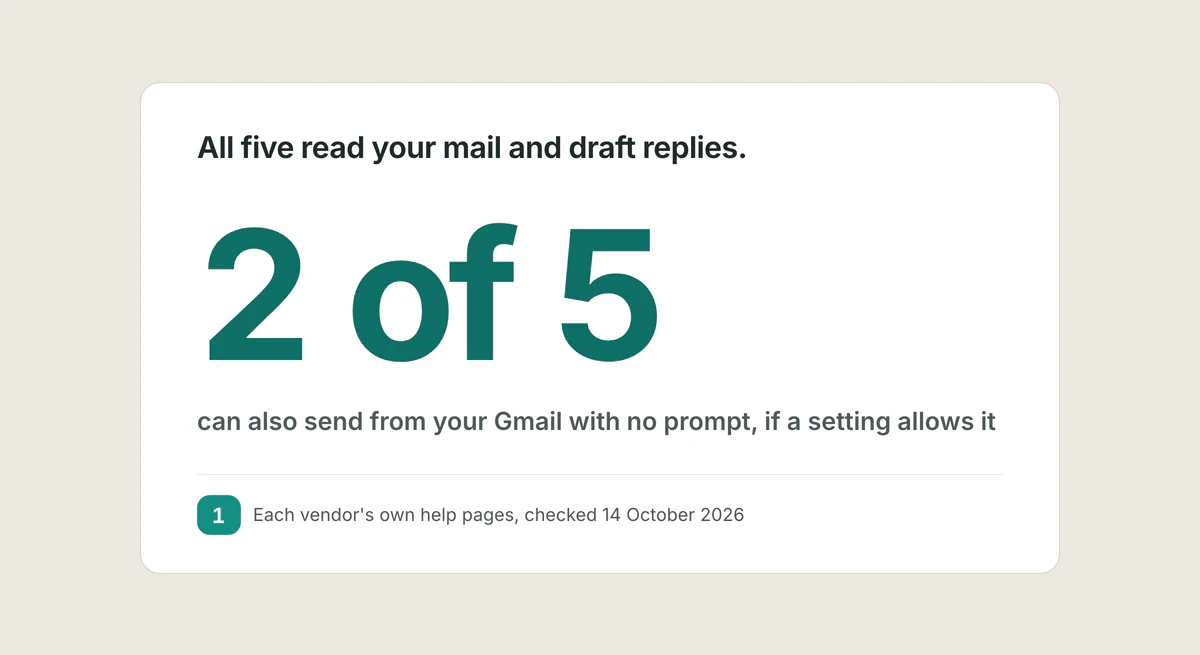
Gmail assistants compared
Checked 14 October 2026 against each vendor's own pages: which assistants read, draft and send from Gmail, what approval each asks for, and where Tatsulok falls short.
Read the article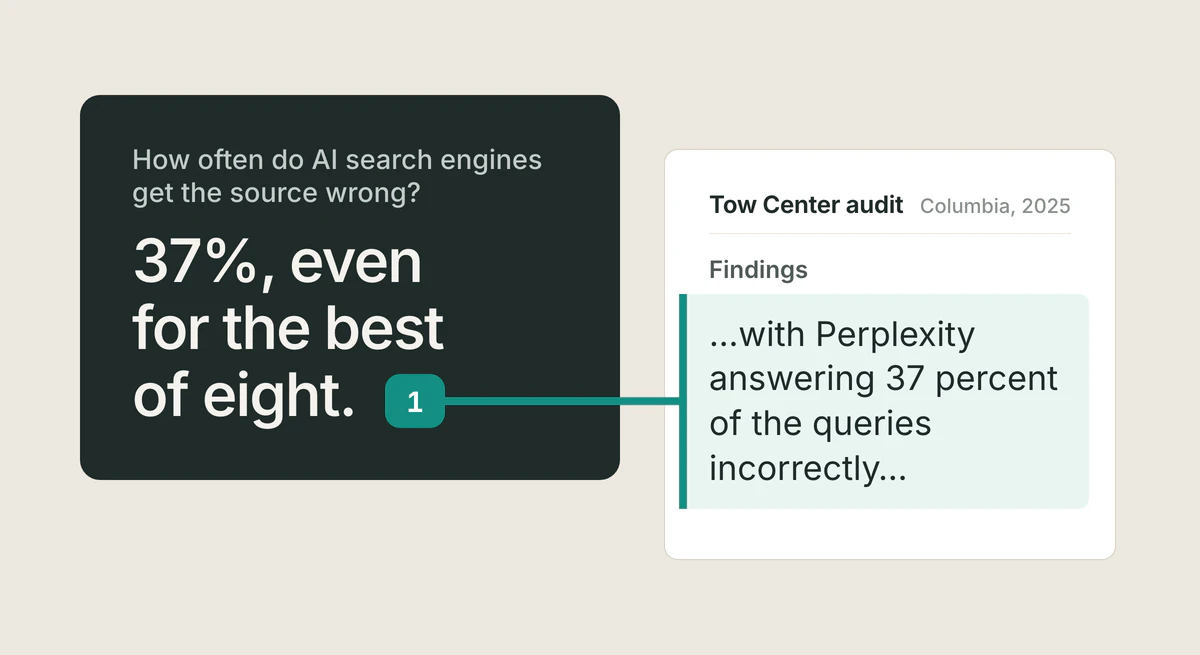
Best AI research assistants
We ranked the best AI research assistants of 2026 by one criterion: can you verify the answer? Citation audits, hallucination rates, and which tool fits which job.
Read the article