How to let an assistant answer from your Google Drive
Connect your Drive on Google's permission screen, ask your question, and check that the answer names the file and the passage it used. Two choices decide whether it is worth it: how much of your Drive you let the assistant read, and whether you can open the exact source of each answer in one click. Facts about other products below were checked on 14 October 2026.
Updated
How does an assistant read your Google Drive?
You give permission on Google's own screen, not inside the tool. When you press Connect, Google lists what the app asks for, and you approve it there. You can take it back at any time in your Google Account, under linked apps: pick the app and choose Remove access.
After that, a tool works with your files in one of two ways. Live reading: each time you ask, it searches Drive and reads what it finds, so the answer reflects today's file. Or a copy: it brings files into its own index, which is fast to search but can miss an edit you made an hour ago. Many tools now read live. OpenAI's help page says a personal Drive connection "provides live access only", and Claude's Drive docs page says Claude "reads the file's current content from Drive each time you send a message".
What is the difference between drive.file and whole-Drive access?
Google offers two very different keys (Google's Drive permissions page, updated 3 September 2026). drive.file is narrow: it covers files "that you open with an app or that the user shares with an app". Google calls it non-sensitive and says it is recommended "for most use cases". drive.readonly is wide: "View and download all your Drive files." Google calls it restricted, and an app that reaches restricted data through its own servers must go through a security assessment every year, with some exceptions.
There is no Google permission for "one folder". Some tools add their own limits on top: since 13 August 2026 OpenAI has been rolling out a way to "select a folder and ask ChatGPT to work across the files it contains", and Notion's connector respects the sharing settings you already have in Drive. But the permission you approve on Google's screen is what the app can reach, so read it before you click Allow.
Which files can it read?
Most tools read Google Docs, Slides and PDFs. Claude's Drive docs page lists Docs, Sheets, Slides, PDF, Word, Excel, PowerPoint, OpenDocument, PNG and JPEG files for its Drive connector, which Google builds and runs, and Anthropic's help page says it "extracts text content only". OpenAI's page says ChatGPT can "search files, reference Google Docs, Sheets, and Slides".
Test one thing with your own files before you rely on any tool: a scanned PDF is a picture of words. A tool needs text extraction to read it, and without it the answer comes from somewhere else.
How do you check that an answer came from your files?
The answer should point to the file and to the passage. A file name alone tells you the answer is somewhere in a 40-page contract. The passage shows the exact line, so you can judge whether it supports the claim.
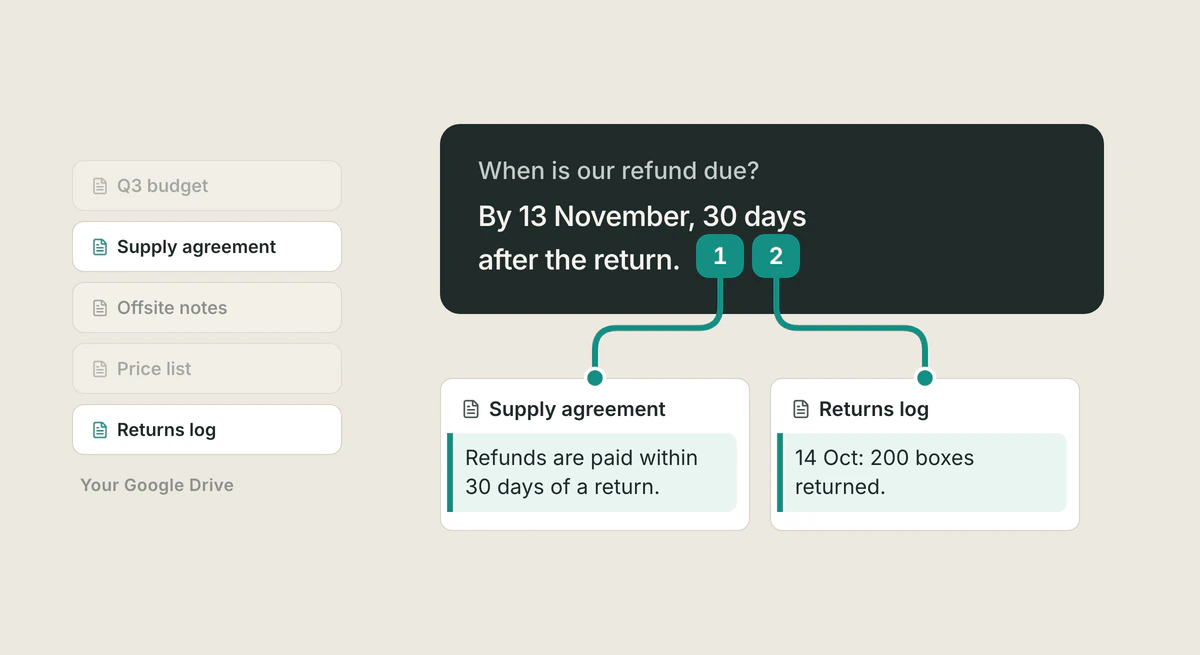
Try it with a real question. You ask "When is our refund due?" A good answer says "By 13 November, 30 days after the return", and cites two files from your Drive: the Supply agreement ("Refunds are paid within 30 days of a return.") and the Returns log ("14 Oct: 200 boxes returned."). Open the first citation and you see the clause; open the second and you see the log entry. Now you can check the date yourself.
If a tool shows only file names, search the answer's key sentence in the file. If the line is not there, do not use the answer. Google says the same about its own product: "Even when Gemini shows sources, it can still get things wrong." More on this in citations you can open.
What do ChatGPT, Claude, Gemini and Notion do with Drive?
ChatGPT reads Drive live on a personal account, can work across a folder you pick, and "may ask you to confirm" before it creates, moves, shares or deletes a file. OpenAI says Library files, Drive included, let you follow citations back to the source; its Drive page does not say whether a citation opens the passage.
Claude's Drive connector is built by Google. Anthropic says Claude shows "citations indicating which emails, calendar events, or documents were used as sources"; no Anthropic page claims it points to the passage. It can also share, move and trash files, with approval on by default.
Gemini needs no connection, because your Drive is already Google's. Google's help page for Gemini in Drive, part of its Workspace Experiments test program, says "Clicking on a source chip will open that source file in a new tab." That is a real strength: the file opens in the Drive you already use.
Notion's connector is for teams: it needs a Business or Enterprise plan, a paid Google Workspace plan, and a person who is both a Google Drive admin and a Notion workspace owner. Notion says "Most connections complete within 36 hours, but large organizations can take longer."
How does Tatsulok read your Drive?
In Tatsulok, open Extensions, choose Connect on the Drives card, and pick Google (or Microsoft for OneDrive). The connection is in Beta. Google has not finished verifying Tatsulok's app, so Google shows an unverified-app screen first; choose Advanced to continue.
Tatsulok asks Google for drive.readonly and drive.file. In plain words: it can read your whole Drive, and change only files it creates with you. Tatsu searches, lists and reads your files and cites the ones it used. You can bring a file or a folder into your Tatsulok library (up to 200 files per run, and subfolders three levels deep); there, a citation opens the document at the page with the quoted passage highlighted, and a dashed amber badge means the file was found but not the exact passage. Tatsu can also export a Google Doc or Slides deck as a PDF into your library, and create files and folders. It moves a file to Drive's trash only after you confirm "Move this file to trash?".
Where it loses: it is not a Drive replacement, it cannot limit itself to one folder at the permission level, and Google's verification screen adds a step today. If you only need a summary of one file, Gemini inside Drive is closer to hand.
FAQ
- Can an assistant read my whole Google Drive?
- Yes, if you approve drive.readonly, which Google describes as "View and download all your Drive files." Google classes it as restricted, so an app that reaches it through its own servers must go through a yearly security assessment, with some exceptions. Read the consent screen to see which permission a tool asks for.
- Can I limit it to one folder?
- Not through Google's permission screen; there is no one-folder permission. Some tools add their own limits, such as ChatGPT's folder option, but the permission you approve is what the app can reach.
- Does it read PDFs and Slides?
- Most tools read Google Docs, Slides and PDFs that contain text. A scanned PDF is a picture, so test text extraction with one of your own files before you rely on the answers.
- How do I know the answer came from my file?
- Open the citation and find the passage. If the tool shows only a file name, search the key sentence in the file. If the line is not there, do not use the answer.
- How do I remove an assistant's access to my Drive?
- In your Google Account, open linked apps, choose the app and select Remove access. In Tatsulok you can also disconnect from Extensions, which revokes access and deletes the stored tokens.
Sources
- Google for Developers: choose Google Drive API scopes (updated 3 September 2026)
- Google for Developers: restricted scope verification and yearly security assessment (updated 19 August 2026)
- Google Account Help: remove an app's access to your Google Account
- OpenAI Help Center: Google Drive in ChatGPT (checked 14 October 2026)
- OpenAI Help Center: ChatGPT release notes (13 August 2026, folders; 10 September 2026, citations in Library; checked 14 October 2026)
- Anthropic Help Center: Use Google Workspace connectors (updated 1 October 2026)
- Claude docs: Google Drive connector (updated 2 October 2026)
- Google Drive Help: Gemini in Drive (Workspace Experiments), source chips
- Google Drive Help: Gemini can still get things wrong
- Notion Help Center: Notion AI connector for Google Drive
- Tatsulok privacy policy: Google user data and Limited Use
Related guides
Drive for AI agents
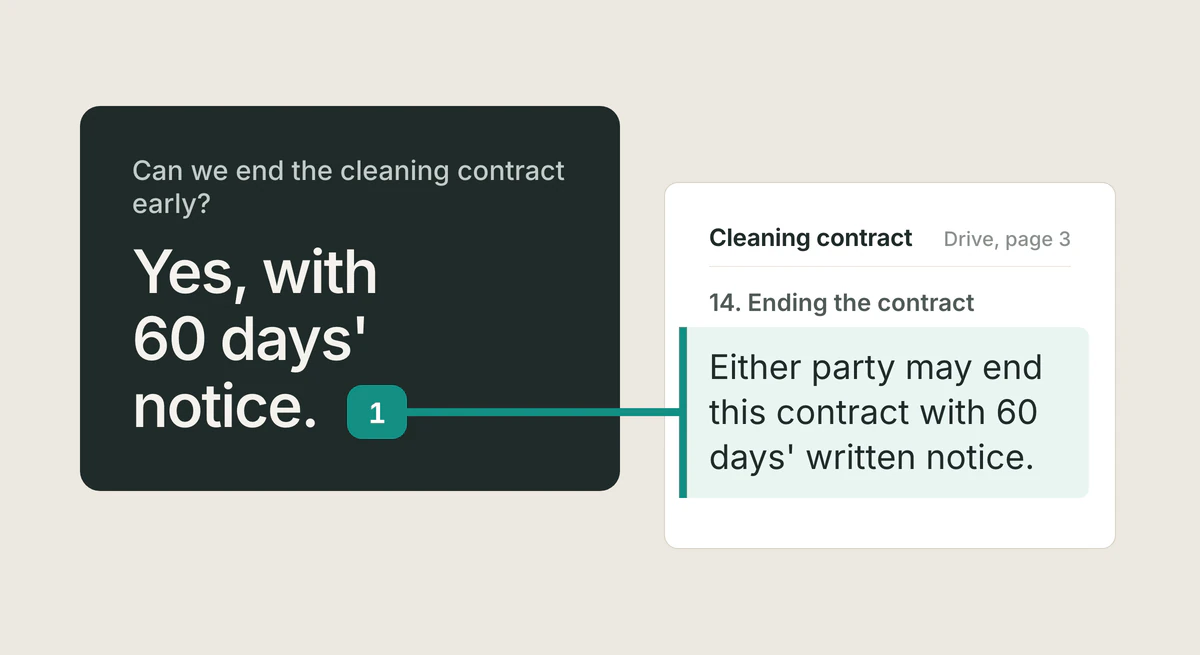
Agent file storage keeps the files an agent makes. To get answers from files you already own, you need something that reads your Drive in place and shows the passage each answer came from. Checked 14 October 2026.
Read the article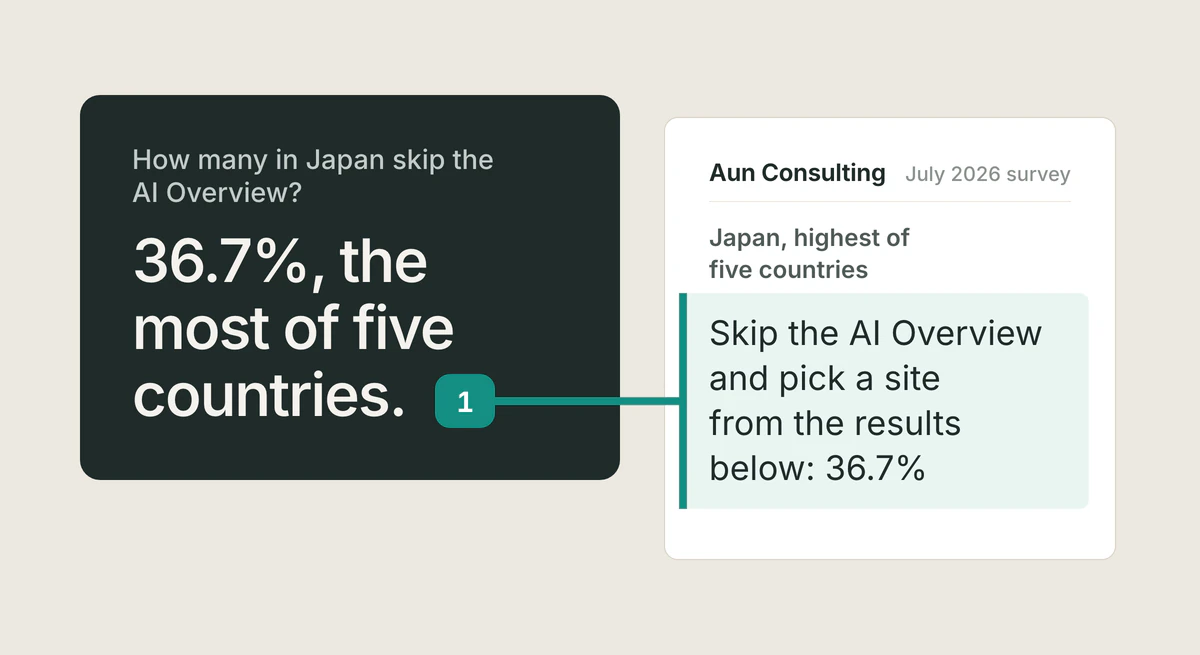
Japan AI search habits
In a 2026 five-country survey, 36.7% of Japanese respondents scroll past the AI Overview to pick sources themselves, the highest rate measured. The same data shows the lowest AI adoption. What both numbers mean.
Read the article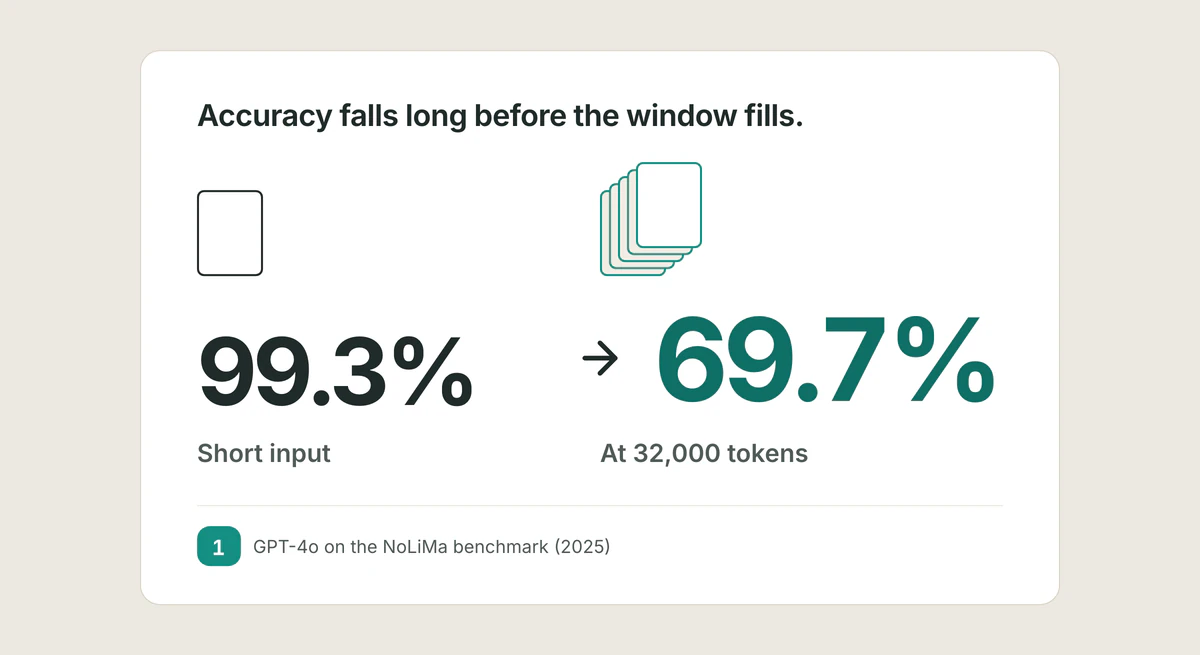
Context rot
Context rot is the accuracy drop language models suffer as input grows, long before the window fills. At 32,000 tokens, 11 of 13 models scored under half.
Read the article